Tester000
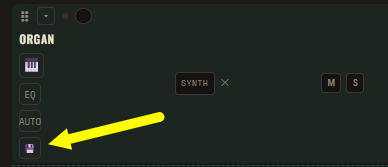
Open a synth track in OCTA/8, dial in the sound you like, then click the 💾 icon on that track (shown above). Log in or create a free account if you're asked, give the preset a name, and it'll show up right here on your profile — ready to reload or share with a link anytime.
Works with every synth on the board — factory tracks and any extras you add (up to 3 of each engine), including 303, 808, Strings, Guitar, Piano, Brass, Organ and 909.
Drum kits: click the 💾 icon on any drum / sample track to share the whole kit (all drum tracks' mix, FX, EQ and patterns) — including any Freesound or uploaded samples loaded onto those tracks, so whoever loads the kit hears it exactly as you built it.
Full songs: click 💾 SAVE SONG TO YOUR PROFILE button (bottom of the page) to save absolutely everything in one go — every synth & drum track's knobs/FX/EQ, every pattern slot and piano-roll note, plus your Song Builder arrangement and saved song library.
OPEN OCTA/8
Comments